Design
Click to EnlargeStylistically, the ThinkPad Edge E430 is a
departure from the traditional ThinkPad design. Instead of a black textured
plastic lid, our Edge E430 featured a black brushed aluminum cover. It's a nice
change of pace, but unfortunately turns the laptop into a fingerprint magnet.
If brushed aluminum isn't your thing, you can instead opt to get the E430 in
soft-touch black or red.
Lenovo decorated the E430's lid with a familiar polished
silver Lenovo logo in the bottom right corner. Opposite that, you'll find the
ThinkPad logo with the letter "i" that pulses when the notebook is in
standby mode.
Take a look under the E430's lid and you'll see the same
brushed aluminum coating on the keyboard deck. In the top left corner, you'll
find the E430's circular power button surrounded by nothing but empty space. In
the deck's bottom right corner, Lenovo added another ThinkPad logo complete
with a backlit letter "i." Beyond those design flourishes, the Edge
E430 includes the company's trademark red pointer stick and click buttons,
fingerprint reader and clickpad.
Measuring 13.3 x 9.2 x 1.1-1.3 inches and weighing 4.6
pounds, the Lenovo ThinkPad Edge E430's dimensions are on a par with those of
its predecessor, the ThinkPad Edge E420 (13.3 x 9.1 x 1.4 inches and 4.6
pounds). The Edge E430 also matches up nicely with Acer's Aspire TimelineX 4830TG-6808,
which measures 13.3 x 9.4 x 1.2 inches and weighs 4.6 pounds. Other 14-inch
notebooks are more svelte than this Edge, especially Ultrabooks, but most of
them lack an optical drive.
Display
and Audio
Click to EnlargeThe E430's 14.1-inch 1366 x 768 anti-glare
matte display offered a sharp but not very bright picture. Its 176 lux
brightness rating is well below the average thin-and-light (201 lux). The Acer
4830TG was little better, at 186 lux. An optional VibrantView glossy display
promises sharper brighter colors, but will naturally suffer from glare
problems. When watching an HD trailer for "The Hobbit," we could make
individual strands of hair in Gandalf's telltale gray beard. Viewing angles,
however, were fairly narrow, with images washing out before 40 degrees to
either side.
The ThinkPad Edge E430's stereo speakers, located on the
underside of the system, are surprisingly powerful for a small business laptop.
When we listened to Nicki Minaj's "Beez in the Trap," each bass hit
sounded clean and distortion-free. Kansas' "Carry on Wayward Son"
sounded just as good, with the blues-inspired guitar riffs and cymbal crashes
coming through loud and clear. The included Dolby Advanced Audio 2 software is
a definite plus. Turn it off, and the Edge's audio quality takes a significant
hit.
Keyboard,
Pointing Stick and Touchpad
Click to EnlargeWe've long considered Lenovo's keyboards to
be some of the best in the business, thanks to their responsiveness, key
spacing and overall comfort. The E430's spill-resistant, island-style keyboard
lives up to that reputation. We recorded our highest score on the Ten Thumbs
Typing Tutor while using the E430, 80 words per minute with a 3 percent error
rate, far better than our usual 75 words per minute. The layout felt somewhat
stiff, but we presume this will lessen as you break it in.
The E430's rubberized TrackPoint pointing stick and
associated mouse and scrolling buttons proved accurate and responsive as ever,
allowing us to seamlessly transition from typing to controlling the on-screen
pointer and back without ever having to take our hands off of the keyboard.
Click to EnlargeThe Lenovo's 3.5 x 2.1-inch UltraNav
textured clickpad was also quite accurate. Multitouch gestures worked for the
most part, but we found ourselves repeating some of them occasionally, such as
using the three-finger flick function to navigate the picture gallery.
Two-finger scrolling and pinch-to-zoom, however, were spot on.
Heat
After streaming a full-screen Hulu video for 15 minutes, the
ThinkPad Edge E430's touchpad reached just 79 degrees, while the keyboard
registered 80 degrees. The hottest point on the Edge was its underside, which
hit a relatively cool 83 degrees. We consider temperatures below 95 degrees to
be comfortable.
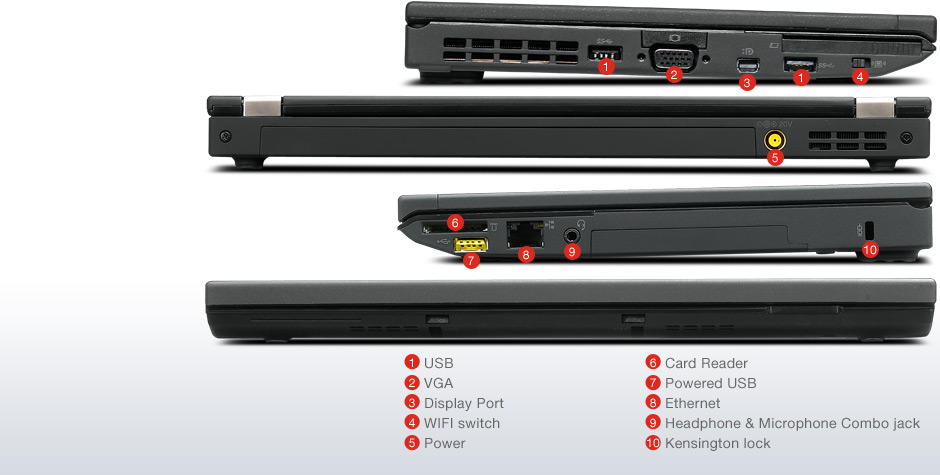
The ThinkPad Edge E430 includes all of the ports and plugs a
small business owner could need. On its left side are a VGA port, USB 2.0 slot,
HDMI port and two USB 3.0 ports. Over on the right side, are the E430's power
port, Ethernet jack, tray-loading optical drive, a USB 2.0 port that can charge
devices while sleeping and a combination audio and microphone jack. Up front,
the E430 features a 4-in-1 media card reader.
Webcam
and Videoconferencing
Click to EnlargeThe Edge E430's 720p webcam provided bright,
but slightly grainy images. Fine details like facial wrinkles were easy to
decipher, although colors were somewhat inaccurate. When we tried using the
webcam in a darker setting, image quality took a nose dive.
To help improve voice chat quality, Lenovo outfitted the
Edge E430 with keyboard noise cancellation technology. Lenovo says the E430's
microphone audio field has also improved to allow users to switch between
conference mode, in which several people can be picked up by the microphone,
and single user mode, which only picks up the voice of the person sitting
directly in front of the microphone.
Fingerprint
Reader
Click to EnlargeOur ThinkPad Edge E430's fingerprint reader
was extremely easy to set up, and can be set to open specific websites and apps
with the swipe of a finger. We could also set the reader to log us into secure
websites, as well as log on to Windows.
Performance
Our configuration of the ThinkPad Edge E430 comes with a
second-generation (Sandy Bridge) 2.5-GHz Intel Core i5-2540M processor rather
than a newer third-generation Ivy Bridge CPU. However, you can configure this
laptop with one for $55 more. Still, with 4GB of RAM and a 500GB, 7,200-rpm
hard drive, our Edge E430 proved more than capable of holding its own against
the competition.
On PCMark 07, a synthetic benchmark that tests a system's
overall performance, the E430 scored 2,337. That's on a par with the
thin-and-light laptop category average (2,389), and about 200 points higher
than the Acer Aspire TimelineX 4830TG-6808, which has the same CPU.
The Edge E430 also managed to boot faster than the
competition, starting up in just 44 seconds compared with the category average
of 57 seconds and the Acer 4830TG's 65 seconds. That's largely a result of the
difference in rotation speeds between the E430's 500GB, 7,200-rpm drive, and
the Acer's 500GB, 5,400-rpm drive.
The ThinkPad Edge E430 fared pretty well on the LAPTOP File
Transfer test, duplicating 4.97GB of mixed media files in 2 minutes and 53
seconds for a rate of 29.4 MBps. That's nearly identical to the category
average of 29.9 MBps.
The E430 also performed well on our OpenOffice Spreadsheet
test, matching 20,000 names to their corresponding addresses in 5 minutes and 4
seconds. This showing is just two seconds slower than the Aspire TimelineX, but
faster than the category average of 6 minutes.
Graphics
Performance
Having Intel's HD Graphics 3000 on board means you'll be
limited to watching HD movies and mostly casual games. On the 3DMark06
benchmark, the Edge E430 scored just 3,822. That's well below the category
average of 5,117, and more than 5,000 points below the Acer Aspire TimelineX,
which benefits from an Nvidia GeForce GT 540M GPU.
When we played "World of Warcraft" with the
graphics set to autodetect, the Edge E430 managed 34 frames per second, an
acceptable frame rate for a nongaming machine. But when we bumped up the
graphics to the highest setting, the frame rate dropped to an unplayable 17
fps. By comparison, the average thin-and-light notebook registers 52 and 26
fps, respectively.
Battery
Life
Click to EnlargeThe ThinkPad Edge E430's 6-cell 62WH lithium
ion battery provides plenty of endurance for mobile workers. On the LAPTOP
Battery Test, which involves continuous Web surfing with the display brightness
set to 40 percent, the Edge E430 lasted 6 hours and 53 minutes. That's 33
minutes longer than Lenovo rated the battery and 25 minutes longer than the
thin-and-light notebook category average.
Configurations
Our E430 came equipped with a 2.5-GHz dual-core Intel Core
i5-2450M processor; 4GB of RAM; a 500GB, 7,200-rpm hard drive; an Intel HD
Graphics 3000 integrated graphics chip; anti-glare display; 720p webcam ($20);
62WH battery ($10) and Windows 7 Professional for $719. The brushed aluminum
coating alone cost $50. Note that some online retailers are selling this
notebook for as low as $649.
If you're looking for something with a bit more oomph, you
can pick up an E430 with a 2.1-GHz quad-core Intel Core i7-3612QM processor,
8GB of RAM, a 750GB hard drive and a 16GB Micro SSD ($40) for improved performance
for $1,154.
If your budget is tighter, you can buy the base model for
just $549. That version comes loaded with a 2.3-GHz dual-core Intel Core
i3-2350M processor, 4GB of RAM, a 320GB hard drive, no webcam, a soft-touch
paint job and Windows 7 Home Premium. There's no price difference between the
anti-glare display or VibrantView screen.
Software
Click to EnlargeLenovo loaded the ThinkPad Edge E430 with
some helpful utilities. For instance, Power Controls lets you optimize your
system's power settings, and Enhanced Backup and Restore and Airbag Protection,
which turns off the hard drive when a fall or other damaging event is detected.
In addition to those, the E430 features Lenovo's SimpleTap tool, which provides
you with quick access to different notebook features, websites and applications
by two-finger tapping the laptop's clickpad twice.
Lenovo's RapidBoot and RapidBoot Shield features help to
improve the system's boot speed by using the E430's RAM to cache boot files and
delaying the launch of nonessential programs until Windows is fully started.
The Edge E430's InstantResume software helps users reconnect
to the Web quickly when taking the laptop out of sleep mode. Lenovo says the
feature will continuously scan for Wi-Fi connections, allowing the system to
connect to the web in less than two seconds when it goes back online.
One of the most useful features Lenovo packed into the E430
is its Mobile HotSpot software. The program lets users configure the E430 to
act as a Wi-Fi hotspot for up to five people. The feature works by connecting
the Lenovo to an available hotspot, then setting Mobile Hotspot software to
begin broadcasting a wireless signal for your co-workers or friends. And since
Lenovo lets you set up your own Network SSID and password, the wireless signal
you send out will be secure.
Other programs loaded on the E430 include a 30-day trial of
Norton Internet Security, 5GB of free online storage through SugarSync and
Splashtop Streamer.
Service
and Support
Lenovo provides users with its Solutions for Small Business
suite. Features include the ability to schedule when you would like the system
to perform updates and basic upkeep, configure the E430's USB ports to block
users from attaching thumb drives or gaming controllers and set the system to
shut down in the evening and restart in the morning.
If you run into any trouble with your ThinkPad Edge E430,
Lenovo provides its users with a standard one-year parts and labor warranty.
See how Lenovo fared in our Best & Worst Brands Report.
Verdict
Click to EnlargeWith good performance, an excellent
keyboard, long battery life and top-notch speakers, the $717 Lenovo ThinkPad
Edge E430 is a system that will fit well in any office. The easy-to-use
fingerprint reader and helpful small business software are other pluses.
However, you might want to skip the brushed aluminum lid for the soft-touch red
or black option to avoid fingerprints--and save yourself $50 in the process.
The only other drawback is this notebook's display, which is dimmer than
average. Overall, though, the Lenovo ThinkPad Edge E430 is a great choice for
small business users.


 Posts
Posts





.jpg)




.jpg)


