Posts





Specification
CPU
|
2.3GHz Intel Core i7-3610QM Quad-Core
processor
|
Operating System
|
MS Windows 7 Professional (64-bit)
|
RAM
|
16GB
|
RAM Upgradable to
|
|
Hard Drive Size
|
750GB with 32MB cache and 8GB SSD
|
Hard Drive Speed
|
7,200rpm
|
Hard Drive Type
|
|
Display Size
|
11.6
|
Native Resolution
|
1366x768
|
Optical Drive
|
None
|
Optical Drive Speed
|
n/a
|
Graphics Card
|
Intel HD Graphics 4000 / NVIDIA GeForce GTX
650M Graphics
|
Video Memory
|
2GB
|
Wi-Fi
|
802.11b/g/n
|
Wi-Fi Model
|
Intel Centrino Advanced-N 6230
|
Bluetooth
|
|
Mobile Broadband
|
|
Touchpad Size
|
3.4 x 1.7 inches
|
Ports (excluding USB)
|
Ethernet; HDMI; Headphone; Microphone; USB
3.0; VGA; security lock slot
|
USB Ports
|
3
|
Card Slots
|
3-1 card reader
|
Warranty/Support
|
1 year standard warranty
|
Size
|
11.5 x 8.3 x 1.5 inches
|
Weight
|
3.8 pounds
|
Design
Click to EnlargeWe had an instant sense of
déjà vu when we first saw the W110ER, as its chassis is nearly
identical to the Eurocom
Monster. That said, we're are still big fans of the subdued, rubberized lid
with its faint gridlines. The smooth bisected strip is also present, but the
Clevo W110ER doesn't feature a chrome logo in the center like the Monster.
AVADirect also offers custom paint jobs for an additional $350 for people who
like a more unique look.
Opening the notebook reveals a rubberized palm rest and the
touchpad. The top of the deck also features the rubberized grid with green
status lights for Caps Lock, Num Lock and Wi-Fi on the left, and a large power
button on the right. The middle of the deck is slightly recessed and has a
soft-touch rubberized panel.
Although the Clevo W110ER and the 4-pound, Eurocom Monster
share the same 11.5 x 8.3 x 1.5-inch chassis, the W110ER is a tad lighter at
3.8 pounds.
Display
Click to EnlargeThe W110ER's 11.6-inch LED glossy display
delivered clear, sharp text as we read CNN.com and Joystiq.com. At 186 lux, the
1366 x 768p display is slightly brighter than the Monster's 173 lux display,
but it wasn't enough to match the 228 lux category average. As we watched the
1080p YouTube trailer of "The Amazing Spider-Man," we noticed lovely
reds and beautiful blues. However, we noticed severe pixelation during the
night scenes as Spider-Man vaulted over the police. Viewing angles were limited
to a shallow 45 degrees, instantly washing out if we weren't directly in front
of the display.
Still we had a pretty good time cleaning up the mean streets
of Gotham and kicking some tail in "Batman: Arkham City" and
"Street Fighter X Tekken." The set pieces in "Arkham City"
looked appropriately dark and foreboding and we got our fill of neon cartoony
backdrops in the latest iteration of "Street Fighter."
Audio
Although the W110ER delivered fairly clear sound, it barely
filled a small room. We received a small boost when we enabled THX TruStudio
Pro. When we listened to Wale's "Lotus Flower Bomb," there was a
noticeable amount of hollowness as the organ played. As we played "Batman:
Arkham City," the audio was slightly more robust, delivering crisp clear
dialogue against swelling music. As we engaged the streets of Arkham City, we
heard a thrilling rush of air as we dive-bombed into a group of unsuspecting
enemies couple with satisfying thuds and cracks and moans as we quickly
dispatched them.
Keyboard and Touchpad
Click to EnlargeWhile we realize that the majority of PC
gamers rely on a mouse and a few trusted hotkeys to fight the legions of evil,
we still found the W110ER's island-style keyboard keys were too small. The
direction keys, Right Shift and Right Ctrl were especially undersized. However,
the keys were generously spaced and delivered good firm feedback.
The textured 3.4 x 1.7-inch Synaptics touchpad delivered
swift responsive multitouch action. Gestures such as pinch-to-zoom, two-finger
rotation and three-finger press and flick were nice and accurate with no signs
of latency. The discrete mouse buttons offered solid feedback with an audible,
satisfying click.
Heat
We found that the AvaDirect Clevo W110ER runs rather hot.
After 15 minutes of streaming a full-screen Hulu video, the touchpad measured
97 degrees Fahrenheit. That's two degrees higher than our 95-degree threshold
for comfort. The bottom of the notebook registered 96 degrees while the right
side vent, the hottest spot on the laptop, measured 100 degrees. The space
between the G and H keys measured a cool 87 degrees.
After playing "Batman: Arkham City" for 15
minutes, those same areas measured, 106, 94.5 and 104 degrees respectively. The
right side vent was a scorching 115 degrees. Using the notebook in our laps for
more than an hour playing games left us uncomfortably warm.
Ports
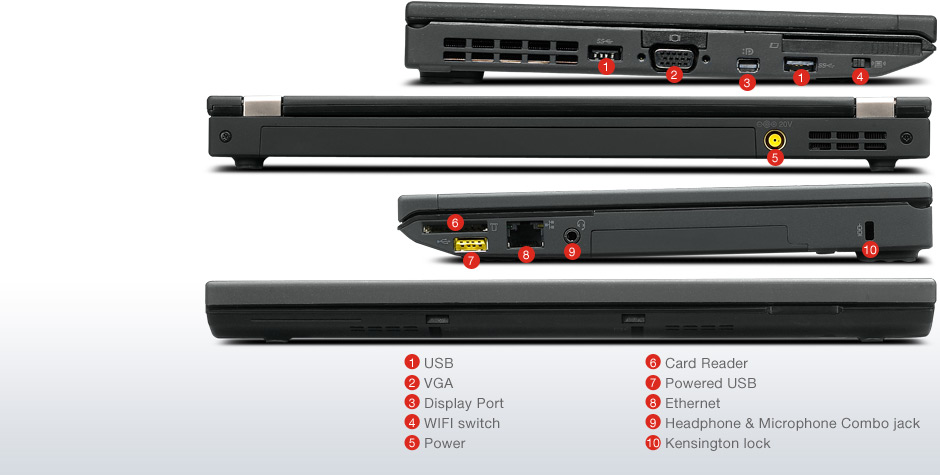
Click to EnlargeA USB 2.0 with charging capability sits on
the right side of the laptop with a secure lock and the power jack. You can
find two USB 3.0, HDMI, VGA, Ethernet, a headphone and a microphone jack on the
left. A 9-in-1 card reader resides along the front lip of the notebook.
Webcam
Click to EnlargeWe were disappointed by the level of
graininess from the W110ER's 1.3-megapixel camera. Although we tried it in both
natural and fluorescent light, the camera continued to deliver a high level of
pixelation along with pale, washed-out color.
Performance
Equipped with a 2.3GHz Intel Core i7-3610QM processor (Ivy
Bridge) with 16GB of RAM, a 750GB 7,200-rpm hard drive with a 8GB Hybrid SLC
SSD and automatic switchable graphics via an Intel HD Graphics 4000 and a
Nvidia GTX 650M GPU (using Optimus), the AVADirect Clevo W110ER packs a serious
punch. We fought a few fast-paced rounds of "Street Fighter X Tekken"
with 13 open tabs in Google Chrome and 10 open tabs in Internet Explorer
running in the background without any latency.
The W110ER also delivered excellent performance during our
synthetic benchmarks, notching an impressive 3,362 on PCMark07. That's 886
points higher than the 2,476 ultraportable category average. However the
Eurocom Monster, which has a slightly more powerful 2.6GHz Intel Core i7-3720QM
CPU and 8GB of RAM, scored 4,299.
We booted the 64-bit version of Windows 7 Professional in 44
seconds thanks to the Clevo W110ER's 750GB 7,200-rpm hard drive with a 8GB
Hybrid SLC SSD, 7 seconds faster than the average. However the Monster's 120GB
SSD booted in a lightning-quick 0:19.
The 8GB SSD cache made itself known during the LAPTOP File
Transfer Test, as the W110ER duplicated 4.97GB of multimedia files in 0:37 for
a transfer rate of 137.5 MBps, beating both the 45 MBps category average and
the Monster's 113.1 MBps. However, when we ran the test without the benefit of
the cache, the drive took 1:55 to complete, a rate of 44 MBps.
It was also a fairly close race on the OpenOffice
Spreadsheet test, with the Clevo W110ER taking 4 minutes and 25 seconds to
match 20,000 names with their corresponding addresses. That's 5:01 faster than
the ultraportable average, but the Monster finished in 4:04.
Graphics and Gaming
Click to EnlargeThe AVADirect Clevo W110ER continued its
show of power during our graphics testing. Thanks to Nvidia's Optimus
technology (Intel HD Graphics 4000 and a Nvidia GTX 650M GPU), the notebook
deftly switched GPUs to optimize our gaming performance. The W110ER did
gangbusters on our synthetic benchmarks, posting 13,890 on the 3DMark06
benchmark. That's a whopping 10,473 points higher than the 3,417 ultraportable
category average. However, the Monster, which has the same Nvidia GeForce GT
650M GPU, scored an even more impressive 14,443.
During our "World of Warcraft" testing, the W110ER
notched a frame rate of 171 fps on Good at 1366 x 768p. That's more than five
times the 32 fps category average. The Eurocom Monster pulled slightly ahead
with 179 fps. When we cranked it up to maximum, the Clevo W110ER delivered 94
fps, far above the 16 fps average. The Monster maintained its lead with 96 fps.
When we pitted the W110ER against the demanding graphics of
"Batman: Arkham City" with the graphics at their lowest setting, the
notebook scored 38 fps, while the Eurocom Monster notched 41 fps. On the
highest setting, the W110ER and the Monster scored 20 fps and 22 fps
respectively,
Our playthrough of "Batman: Arkham City" on 1366 x
768p with antialiasing off yielded smooth animations and a blazing frame rate
of 150 fps. Even we when we were trapped in Penguin's arena with 20+ thugs, the
Dark Knight gracefully flipped between malefactors easily landing punches,
roundhouse kicks and batarangs.
In "Street Fighter X Tekken," Psycho Crushers and
Hadokens were flying across the screen between punches, kicks, counters and
supers. With the settings on 1366 x 768 with antialiasing off, we saw a
blistering framerate of 184 fps.
Software
Aside from Windows 7 Professional and THX TrueStudio Pro,
AVADirect keeps the Clevo WII0ER delightfully free of bloatware.
Configurations
Our $1,326 review model features a 2.3GHz Intel Core
i7-3610QM processor with 16GB of RAM, a 750GB 7,200-rpm hard drive with an 8GB
Hybrid SLC SSD and automatic switchable graphics via an Intel HD Graphics 4000
and a Nvidia GTX 650M GPU (Optimus). The $1,055 base model is equipped with a
2.5GHz Intel Core i5-2520M (Sandy Bridge) CPU, 4GB of RAM, a 750GB 7,200-rpm
hard drive with an Intel HD Graphics 3000 GPU and an Nvidia GeForce GTX 650M
with 2GB of VRAM. On AVA Direct's website, you can customize the W110ER to your
heart's content--there are more than 80 hard drive options available--and you
can even specify the type of thermal paste the company uses.
Battery Life
During the LAPTOP Battery Test which consists of continuous
Web surfing over Wi-Fi, the Clevo W110ER lasted 3 hours and 34 minutes. That's
3:15 shorter than the 6:49 ultraportable average. The Eurocom Monster didn't
fare much better, lasting only 3:28.
Verdict
Click to EnlargeThe $1,326 AVADirect Clevo W110ER is proof
that you don't need a monster 17-inch gaming rig to get your game on. The
11.6-inch mini rig packs all the specs of the big boys into a seriously
portable frame. Our major concerns were the system's heat, as well as its dim
screen; the latter can easily be remedied by hooking this notebook to a larger
display, though. While pretty evenly matched, we'd give a slight edge to the
Eurocom Monster, which provides even more power for $100 more. However, both
companies offer a plethora of customization options, which should satisfy any
gamer looking for a highly portable powerhouse.